
The core of the InBetween Software Suite
InBetween
Server
Publishing automation in the background.
InBetween Server combines your product data with your layout specifications to create publications for print and digital. As the central component of the InBetween Software Suite, it generates catalogs, price lists, datasheets, presentations and other documents.
The server selects content for the required language, currency, unit of measurement, product range or target audience, using your connected data sources and configured publishing rules.
Use InBetween Server as a standalone publishing service for automated workflows or together with other InBetween modules and applications such as Adobe InDesign.
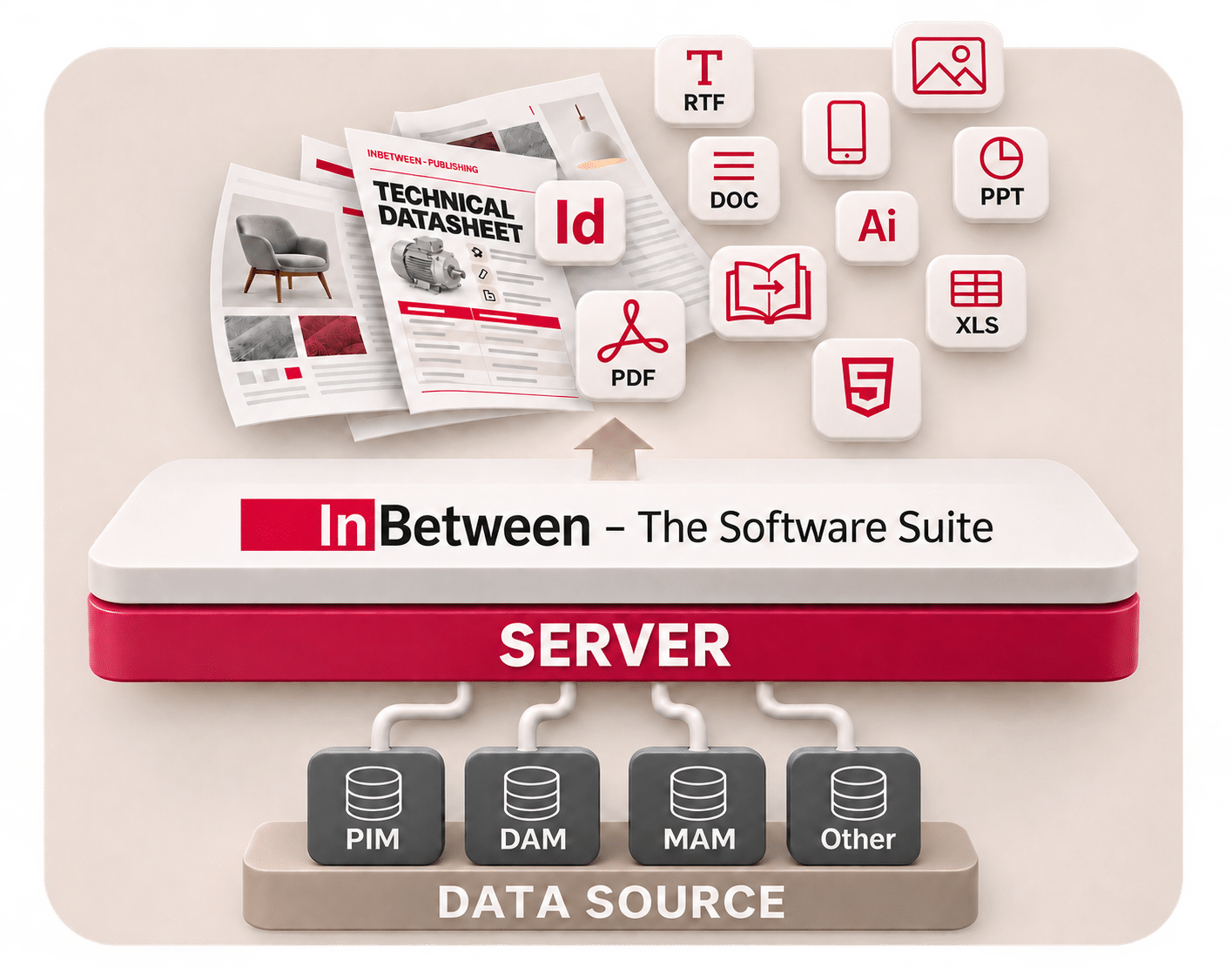
InBetween Server at a glance
- Central publishing service Combines product data with layout specifications and generates your publications.
- Creates a wide range of publications Including catalogs, price lists, datasheets and presentations.
- Supports multiple output formats and languages For example, PDF, InDesign, Word, PowerPoint, Excel and HTML5, with language versions based on the content you provide.
- Automation to suit your workflow From generating individual pages through a user interface to fully automated production in the background.
- Connects to your data sources Uses content from connected systems such as PIM, DAM, MAM and other data sources.
- Cloud-based or on-premises Runs in the cloud or within your own infrastructure, according to your deployment model.
Available output formats and features depend on the modules you license and your system configuration.
Workflows and integration
How InBetween Server works
InBetween Server processes data from your connected sources, applies your configured layout and publishing rules, and generates the required documents. How generation is triggered and integrated into your processes depends on your workflow.
Fully automated in the background
Web services, URL-based generation, batch processing and hotfolders enable automated workflows. Once configured, the server produces the defined publications without manual intervention in each generation step.
From InBetween user interfaces
Users can initiate generation through InBetween interfaces, including its online solutions and InDesign Plugin. The server produces individual pages, page ranges or complete publications, according to the configured level of automation.
Integrated into your systems
The server can operate as a standalone publishing service or connect with other InBetween products and third-party applications. Data connections, generation and output are configured to suit your process.
Use cases
Turn product data into publications
Catalogs in multiple languages and versions
Create catalogs for different markets and audiences. InBetween Server applies your configured language, currency, unit and product range settings when generating each version.
Centrally maintained product data and reusable layout rules reduce manual work on individual versions. Country-specific content and layout requirements are defined in your configuration.
Sales and training presentations in PowerPoint
Use your product data for sales presentations and training materials. InBetween Server can generate PowerPoint presentations based on your configured layout specifications.
This allows you to use the same product data across different publications. The design follows your templates and the requirements of each output format.
FAQ
Frequently asked questions about InBetween Server
Answers about data integration, automation and output formats.
What is the difference between InBetween Server
and Adobe InDesign Server?
InBetween Server and Adobe InDesign Server are different products. InBetween Server combines product data with layout and publishing rules. Adobe InDesign Server processes InDesign documents on a server. Whether an Adobe component is required depends on the output workflow you choose.
Supported local InDesign workflows offer an alternative: a locally installed Adobe InDesign application can be used with Publication Wizard from InBetween 6.2 and with Publisher Pro from InBetween 6.3. This local generation workflow does not require Adobe InDesign Server. Learn more about local InDesign generation.
How do web services, batch processing and hotfolders differ?
These methods differ in how a generation job is triggered and submitted. A web service allows another application to request generation. Batch processing handles jobs in groups. A hotfolder workflow starts with files placed in a designated folder. InBetween Server also supports URL-based generation. The right approach depends on your source systems and the workflow you want to implement.
What data and rules are needed for automated publishing?
You need structured product data, a configured data connection and defined layout rules. Your data should include unique product identifiers, the required text and values, and accessible image files. Templates define which content appears where and how it is displayed. Before starting a project, you should also identify mandatory fields, missing content and the publication versions you need.
How does InBetween Server handle different languages,
currencies and product ranges?
InBetween Server uses the content and values defined for each version in your data and rules. Language versions require the appropriate translations; pricing and product range versions require the corresponding values and product selections. Multilingual output does not, by itself, mean that the server creates missing translations or determines country-specific prices.
Do existing PDFs update automatically when source data changes?
An exported PDF does not change simply because the source data has changed. To include new content, the document must be regenerated through the configured workflow. To automate this, the workflow must define what triggers regeneration and how the job is submitted to the server. Replacing or distributing the finished files is also part of planning the overall process.
Which output formats are available, and how are they licensed?
Available output formats depend on the modules you license and your configuration. Depending on your setup, options may include PDF, InDesign, Word, PowerPoint, Excel or HTML5. Additional output formats may be licensed separately. Before implementation, define the formats you need and the templates or additional components they require.
What determines infrastructure requirements for
larger publication volumes?
Document count alone is not enough to determine infrastructure requirements. Other factors include page count, layout complexity, image sizes, output formats, data access and the number of concurrent generation jobs. Planning should consider representative documents, expected peak demand and required delivery times. These provide the basis for infrastructure and component requirements, as well as a representative performance test.
Your next step
Questions about your publishing project?
Let's discuss how InBetween Server can connect your product data, layout specifications and publishing workflows. In a meeting, we will discuss your data sources, required output formats and automation needs.
Book a meetingCompanies using InBetween





About InBetween
InBetween Deutschland GmbH, a global leader in digital publishing solutions, has been helping companies professionalize their product and brand communication for more than 20 years. Our software automatically creates catalogs, sales folders, price lists, datasheets, and more, all based on your latest product data. This saves you significant and measurable time and costs, while increasing the quality of your output documents by reducing manual errors. Our solution offers both fully and partially automated publications, personalized for different customer segments, in a variety of output formats and languages – all in a layout that suits your company.
