
InBetween solutions
Datasheet
automation
Create and update product and
technical datasheets automatically
using your existing product data.
With InBetween, manufacturers and distributors can automate
datasheet creation. Text, specifications, images and symbols are
pulled from existing data sources and placed in your chosen layout.
When product information changes, you can quickly regenerate the
affected datasheets.
Spend less time on manual work and create consistent datasheets
for different products, languages and markets.
Discuss your datasheet workflow

For manufacturers with extensive product ranges, multiple variants and detailed technical information.
The challenge
Many products. Many languages.
Every datasheet needs to be accurate.
Datasheets help your customers choose and use your products. They provide technical specifications, application details, safety and installation instructions, and information about standards and certifications.
A change to a single specification or standards reference can affect dozens of datasheets in multiple languages. When you maintain these documents manually, every new product and variant adds to the workload. Keeping track of the latest versions becomes harder, too.
Datasheet automation turns existing product data into finished documents using templates and predefined layout rules.
InBetween pulls text, technical specifications, images and symbols from sources such as PIM systems, ERP systems or Excel files and presents them in line with your brand guidelines. Rules determine which information appears and how it is displayed—for example, as a table, symbol or text.
When product information changes, you update it in the source system. You can then regenerate the affected datasheets with the latest data.
This reduces repetitive layout work and errors caused by copying information manually. It also makes it easier to produce large numbers of consistently designed datasheets in the languages you need.
When does datasheet automation make sense?
Datasheet automation is particularly useful when you produce large numbers of documents, need several versions and update them regularly.
-
Extensive product ranges
You need datasheets for hundreds or thousands of products and variants that follow the same layout rules.
-
Technical and regulatory information
You need to present technical specifications, standards references, certifications and safety instructions consistently, using information maintained in your source systems.
-
Multiple languages and markets
You create datasheets in multiple languages, with product information tailored to each market.
-
Frequent product updates
Changes to specifications, images or product variants mean your datasheets need regular updates.
-
Multiple brands or business units
You need different layouts for brands, business units or product groups and want to manage datasheet creation centrally.
Customer results
What can datasheet automation deliver?
ARKEMA
More than 8,000 working days saved
66% lower costs
Arkema brought product information previously spread across multiple systems together in Akeneo PIM. With InBetween, the company now automatically generates technical datasheets in layouts tailored to each business unit.
Creating a datasheet now takes just 3 minutes instead of an hour. New products reach the market 50% faster. Data quality has also improved significantly, and Arkema reports savings of several million euros.
Read the customer story


PORTWEST
Datasheets in 28 languages for
international markets
Generated automatically from Akeneo PIM in seconds
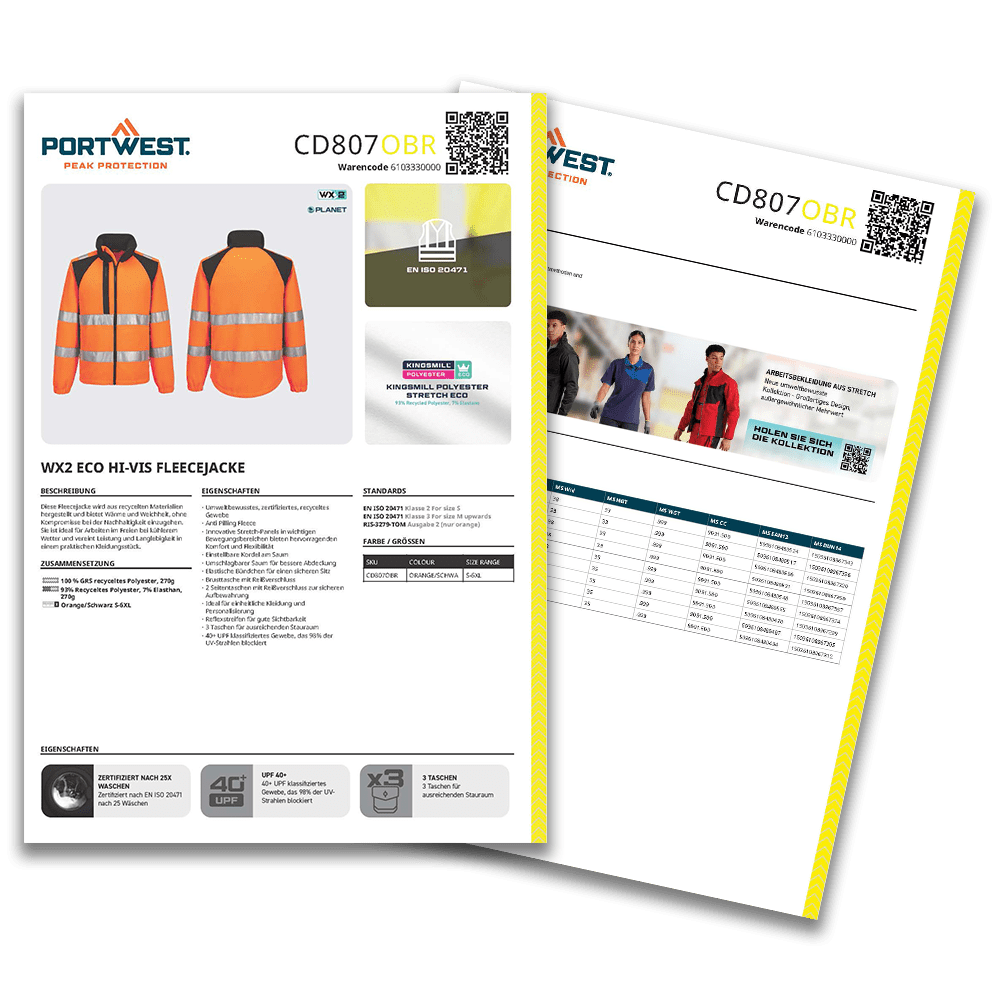
Portwest operates in more than 130 countries and manages around 47,000 product variants. The workwear and protective clothing manufacturer uses InBetween to generate technical datasheets automatically from Akeneo PIM. Each datasheet includes high-quality product images, clearly highlighted product features, certification symbols and dynamic QR codes.
Documents that once served purely as a source of information now double as attractive sales and marketing materials. Automation reduces manual layout work and enables Portwest to produce up-to-date datasheets in 28 languages.
Read the customer story

SWISS KRONO
500 datasheets in just 1.5 hours
instead of 20
10 languages, 5 layout variants
SWISS KRONO produces product datasheets of up to four pages for a range of more than 10,000 material variants. With InBetween, the company reduced the time needed to create 500 datasheets from 20 hours to just 1.5 hours. The solution also supports multilingual datasheets. Automated overnight generation ensures that newly generated documents contain the latest product information.
Read the customer story


How it works
Four steps to automated datasheets
-
Connect your data
InBetween pulls text, technical specifications, images and symbols from your existing systems. You continue to maintain your data in its original sources.
-
Define your datasheet requirements
Decide which datasheets you need, which product groups, brands, languages and markets they cover, and which information each one must include.
-
Set up your templates and layout rules
Templates and rules determine how your content is presented: which specifications appear in tables, for example, and where images, standards references and symbols are placed. You can reuse these rules across products and language versions.
-
Generate your datasheets
Create PDF datasheets for download, print or sharing. Generate individual documents on demand or produce them in batches on a schedule. Additional output formats can be defined as part of your project.
Integrations
Keep your data where you already maintain it.
Technical specifications, images and certifications are often stored in different systems. InBetween brings together the information needed for your datasheets. Together, we identify the right integrations for your existing systems.
PIM
Product descriptions, technical specifications and variants
ERP
Item numbers and item information
DAM
Product images, drawings and symbols
Databases
Additional structured product information
Excel, CSV & XML
File-based data sources
Using Akeneo PIM?
The cloud-based Datasheet Automation App lets you generate PDF datasheets directly from Akeneo. The completed files are automatically saved as linked assets. Depending on your edition, you can generate datasheets with a click or schedule them to run automatically.
What you can do
Automate repetitive work.
Keep control of your design.
-
Maintain a consistent design
Templates keep your datasheets consistent, even when different teams or business units create them.
-
Create content for different markets
Use your existing translations and product information to generate datasheets with the right content for each language and market.
-
Update datasheets when you need to
Regenerate datasheets using the latest information from your data sources. You can also schedule recurring updates.
-
Give your teams self-service access
With a web portal configured for your needs, sales teams, distributors and partners can generate their own documents. Portwest uses this approach to let distributors create customised flyers and catalogues.
FAQ
Frequently asked questions about datasheet automation
Find answers about data sources, data quality, output formats and getting started with datasheet automation.
Do we need a PIM system to get started?
No. A PIM system provides a useful central source of product information, but you can also get started with other data sources. InBetween can work with structured data from ERP systems, databases, XML, CSV and Excel files. What matters is whether the information your datasheets need is available and reliably maintained.
What if our product data is incomplete?
Automation still relies on well-maintained product data. A good starting point is to define the required information for each type of datasheet. This helps you identify which data is ready to use and which information needs to be added or checked by a subject matter expert before publication.
Can standards references, certification symbols and other
graphics be included automatically?
Yes. InBetween can take standards references, certification symbols, pictograms and QR codes from connected data sources and place them according to predefined rules. The information in those sources must be accurate and valid.
Which output formats are available?
Datasheets are usually generated as PDFs for download, print or sharing. Depending on your InBetween solution and project requirements, editable InDesign, Word or PowerPoint files may also be available. The Datasheet Automation App for Akeneo generates PDF files.
How many languages and layouts can we use?
The languages and layout variants you need are defined as part of your project. Portwest publishes datasheets and marketing materials in 28 languages. SWISS KRONO uses 10 languages and 5 layout variants for its datasheets. In each case, the corresponding translations and templates need to be available.
Are datasheets updated automatically when product data changes?
That depends on how your workflow is configured. You can generate individual datasheets on demand or schedule regular generation, for example overnight. Each time a datasheet is generated, it uses the latest data from the connected sources. Copies that have already been downloaded or shared remain unchanged.
How do we get started?
We start by reviewing a few typical datasheets, your data sources, and the languages and variants you need. Together, we identify the relevant data fields and layout rules, then choose a suitable set of datasheets for an initial test. The scope and timeline depend on the available data and the complexity of your documents.
Next step
Let’s talk about your datasheet project.
Bring a few examples of your current datasheets and an overview of your data sources. Together, we’ll identify which datasheets and tasks to automate first.
